Overview
This QRG is for eMMA users with the ability to create Intake Requests, called “Intake Requesters” in eMMA, and DGS Procurement Officers creating PRG requests on behalf of another agency. Intake Requesters can now initiate intake requests, guided by eMMA's intelligent AI assistant, for both IT and non-IT procurement needs in the eMaryland Marketplace Advantage (eMMA).
There are 2 ways to create a PRG Goal Setting request:
- Via an Intake Request with the "Sourcing Request" Intake Type: When an intake request is approved, a PRG request will be automatically generated or manually created (if the value of the intake request contains multiple functional areas).
- Standalone: This intake request is not linked to an existing intake request. As a result, some information will not be automatically populated with data and will need to be completed by the Requester.
Regardless of how the request is created, it will route through the same approval workflow.
- Internal Review
- PRG Compliance Officer Approval
- Department of Social and Economic Mobility Review (only applies to requests with an estimated value of $25,000,000 or more)
Each approver may be checking for different information, but the process of approving or rejecting in eMMA is the same; therefore, the steps below should be followed for all approvers.
IMPORTANT
- The PRG tool is for market research purposes only. This does not replace the DoSEM-approved goal-setting policy or methodology
- Depending on your role in eMMA, your screen may vary slightly from the images shown in this QRG.
- For best results, use the Google Chrome browser to access eMMA.
- If you need help at any time, please reach out to the eMMA helpdesk at emma.helpdesk@maryland.gov.
Step-by-Step Instructions
This QRG uses diagrams with specific callouts to show required and optional fields in forms. A yellow callout with a red border  indicates a required field, while yellow callouts with a black border
  indicate optional fields. Letters within the callouts correspond to the explanations below the diagram. This section of the QRG explains how to submit a PRG request created based on an intake request that you oversaw in eMMA.
- Access eMMA at https://emma.maryland.gov and log in with your credentials.
NOTE: Depending on your agency, you may only need to click the State SSO Login (Secure Auth) button or the MDOT SSO Login (MSAzure) button and log in with your credentials. - When you are assigned a PRG request for an intake request that you oversaw, you will receive an email notification with a link directly to the PRG request in eMMA. Additionally, you can access the PRG request by navigating to the Intake tab at the top of the Main Menu Navigation Bar and selecting Browse Intake Request.
Reviewing a PRG Goal Setting Request
If you are selected to review and approve a PRG Goal Setting request, you will receive an email with a summary of information about the request and a link to the request in eMMA.
- Open the intake request.
- Within the email notification, click the link to the request.
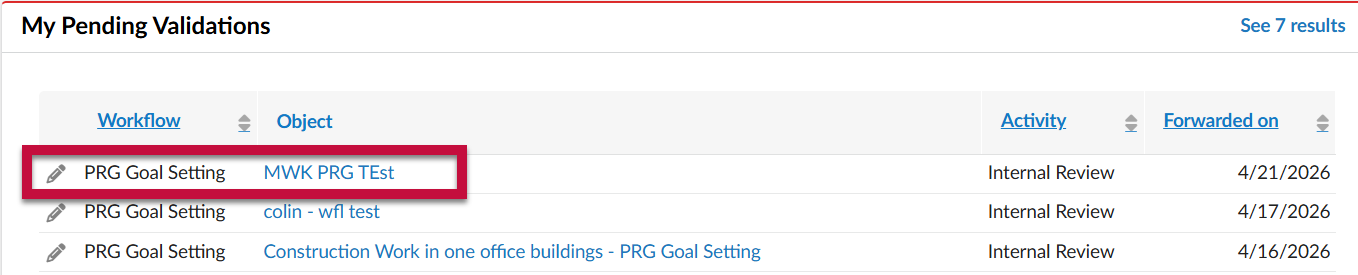
- Under the My Pending Validations section of the homepage, click the hyperlinked name of the request to open the details.
- Review the information within each section.
- PRG Details - Existing Sourcing Project

- Request Information
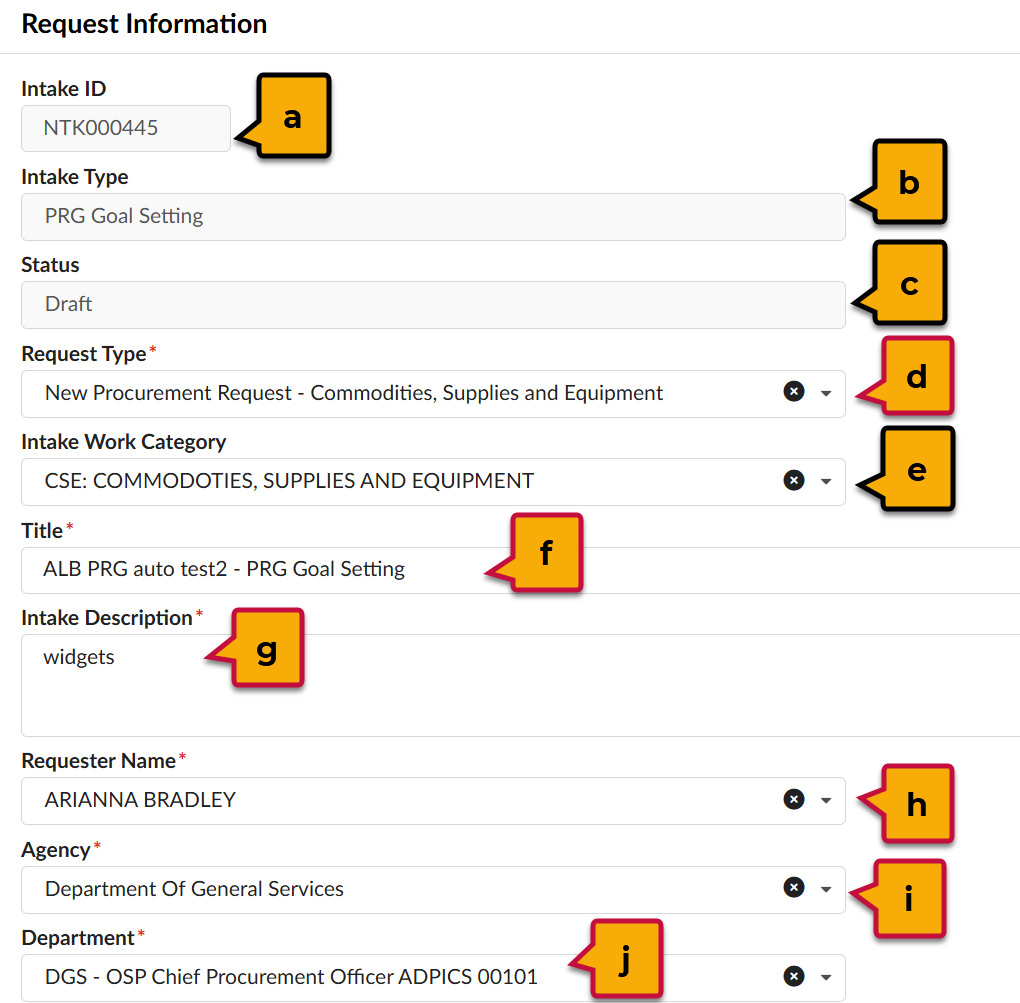
- Intake ID: Unique ID number assigned to the request. Automatically generated by eMMA and uneditable.
- Intake Type: The category for the request (e.g. PRG Goal Setting).
- Status: The workflow status of the request. Auto-generated by eMMA.
- Request Type*: The category for the goods or services requested.
- Intake Work Category: The work category for the request (e.g. CSE).
- Title*: The label for the request. Should be a brief description of the contents.
- Intake Description*: A detailed description of the request.
- Requester Name*: The name of the creator for the request. Auto-populated, but this can be updated if the request is created on behalf of someone else.
- Agency*: The agency that is making the request.
- Department*: The team within the agency that is making the request.
- Estimations
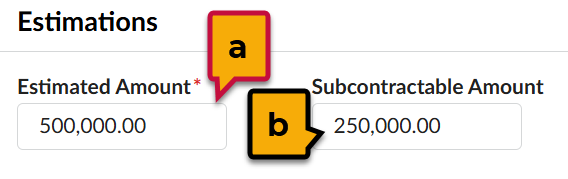
- Estimated Amount*: The total amount of the request.
- Subcontractable Amount: The portion of the estimated amount that can be subcontracted, if limits apply.
- Market Assessment Parameters
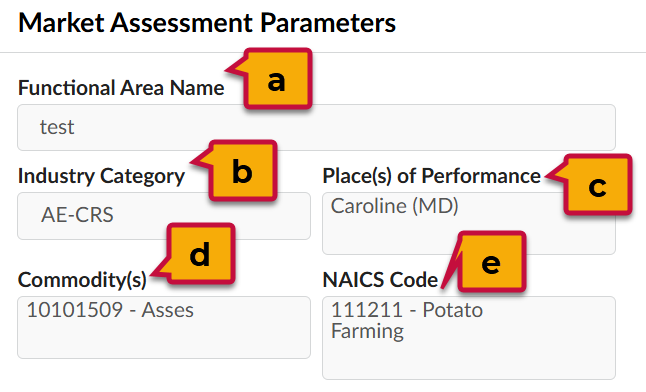
- Functional Area Name*: The functional area associated with the goals.
- Industry Category*: The category that the goods/services fall under according to the list of industry categories.
- Place(s) of Performance*: The geographic areas receiving the goods or where services will be performed.
- Commodity(s)*: The commodity codes associated with the goods or services within the UNSPSC codification system.
- NAICS Code*: The codes associated with the goods or services according to the NAICS codification system.
- Small Business Reserve Program
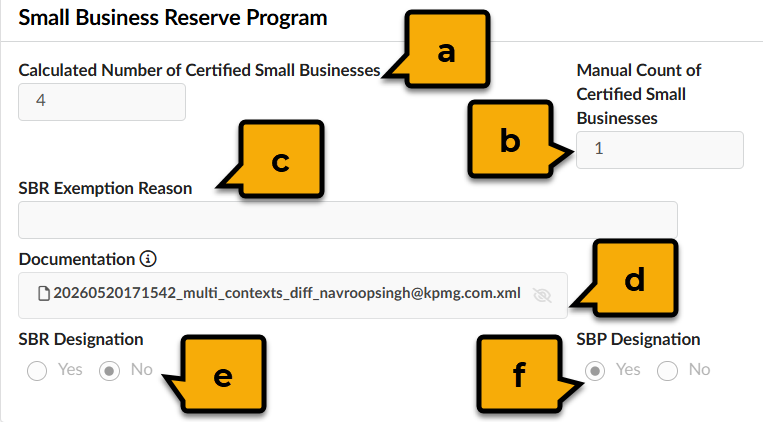
- Calculated Number of Certified Small Businesses: This field indicates the number of certified small businesses that can be considered for this request based on the calculations of eMMA AI.
- Manual Count of Certified Small Businesses: If the Requester believes that the number of available CSBs differs from eMMA AI, this field will contain the final count of CSBs that match the parameters of the request.
- SBR Exemption Reason: This field will show if the request requires an exemption/waiver (i.e. preferred providers, lack of certified small businesses, etc.).
- Documentation: This is where the research on the number of certified businesses, the exemption waiver, or any other supporting documentation can be uploaded.
- SBR Designation: Is the request related to the Small Business Reserve Program?
- SBP Designation: Is the request related to the Small Business Preference Program?
- (optional) Subcontractor Utilization Goals: If the request is over $100,000, the Requester is mandated to enter utilization goals. Requests under $100,000 will not have goals. To review each goal's details, click the Pencil icon next to it.
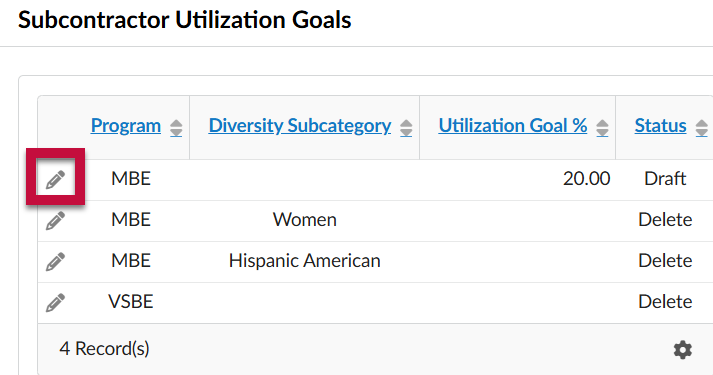
Review the data entered by the Requester.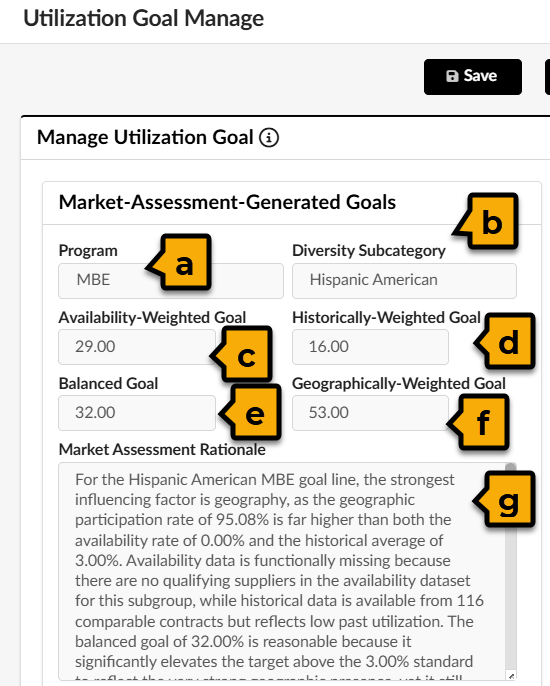
- Program: The relevant diversity program (e.g. "MBE")
- Diversity Subcategory: The applicable subcategory for the program (e.g. African American under the MBE program).
- Availability-Weighted Goal: This recommendation is based on Supplier readiness within available market data.
- Historically-Weighted Goal: This recommendation is based on historical eMMA data.
- Balanced Goal: This recommendation looks at the Availability-weighted, Historically-weighted, and the Geographically-weighted goals to create a balance of all 3.
- Geographically-Weighted Goal: This recommendation is based on the Supplier concentration in a specific geographic market.
- Market Assessment Rationale: Provides a full explanation of how eMMA AI came to created the various goals.
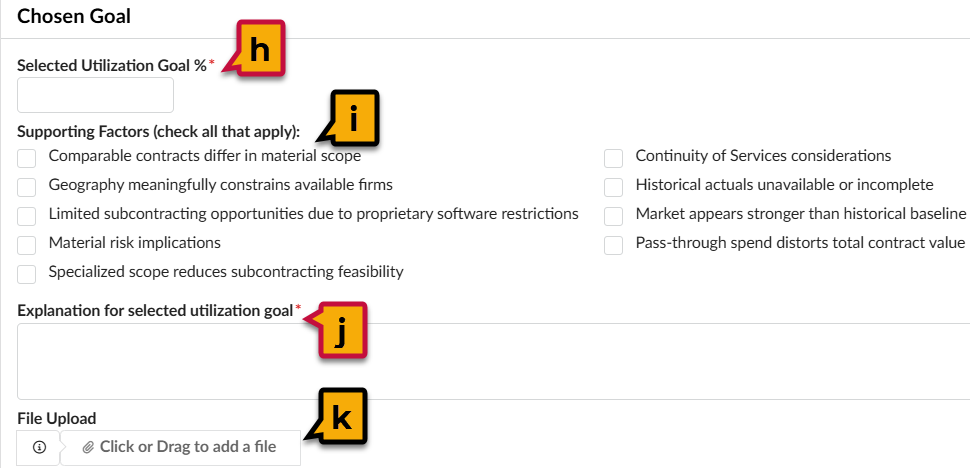
- Selected Utilization Goal %*: This is the final percentage of the total estimated amount that must be allocated towards this line item or diversity category.
- Supporting Factors (check all that apply): The influencing factors when making the determination for the final utilization goal.
- Explanation for selected utilization goal* : A thorough justification for the final utilization goal.
- File Upload: A file that supports the final utilization goal and provides further explanation/supporting factors.
Click Close to return to the request.
- PRG Details - Existing Sourcing Project
- To approve, click Approve.

After the final approver completes their review/approval, a sourcing project will be created and a solicitation can be issued. Refer to the following QRGs for more information on creating and releasing solicitations.
NOTE: If any of the information on the request needs to be edited, the request must be rejected. This will send it back to the user that submitted the PRG request. Approvers can write a rejection reason that can provide more details on why the request was sent back and what needs to be changed.
To reject and send back to the Requester, click Reject.
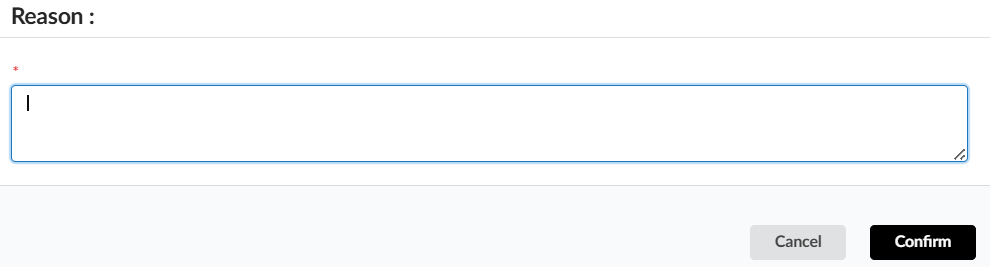
A pop-up window will appear. Write a detailed message to the Requester, then click Confirm.